Usability & Emotional UX
Wrapped: Productivity App UX Study
How do we design a productivity app that respects autonomy while encouraging focus?
Wrapped is a consolidated productivity mobile app designed for university students who struggle with digital distraction. Through a multi-phase research process - from field observation to structured usability experiments - we explored how configurable widgets and dual study modes (individual & group) can support focus without reducing autonomy.
The project evolved from a lo-fi paper prototype to a fully functional web application, validated through rigorous user research at every stage.
University students spend an average of 6h40m daily on screens. The same devices used for learning introduce constant distractions - yet strict interventions like app blockers are widely rejected.
6h 40m
Daily screen time average
8/8
Students citing digital distraction
Majority
Oppose strict app blocking
How might we design a productivity tool that facilitates focus and task management without reducing student autonomy?
Field Study
Understanding Student Habits
Conducted contextual inquiry and field observations to understand how students actually study. Discovered that students are motivated by both extrinsic (grades) and intrinsic (satisfaction) factors.
Ideation & Design
From Insights to Prototype
Translated field study findings into a widget-based productivity app concept. Created lo-fi wireframes and iterated based on team critique and HCI principles.
Prototyping
Building the Experience
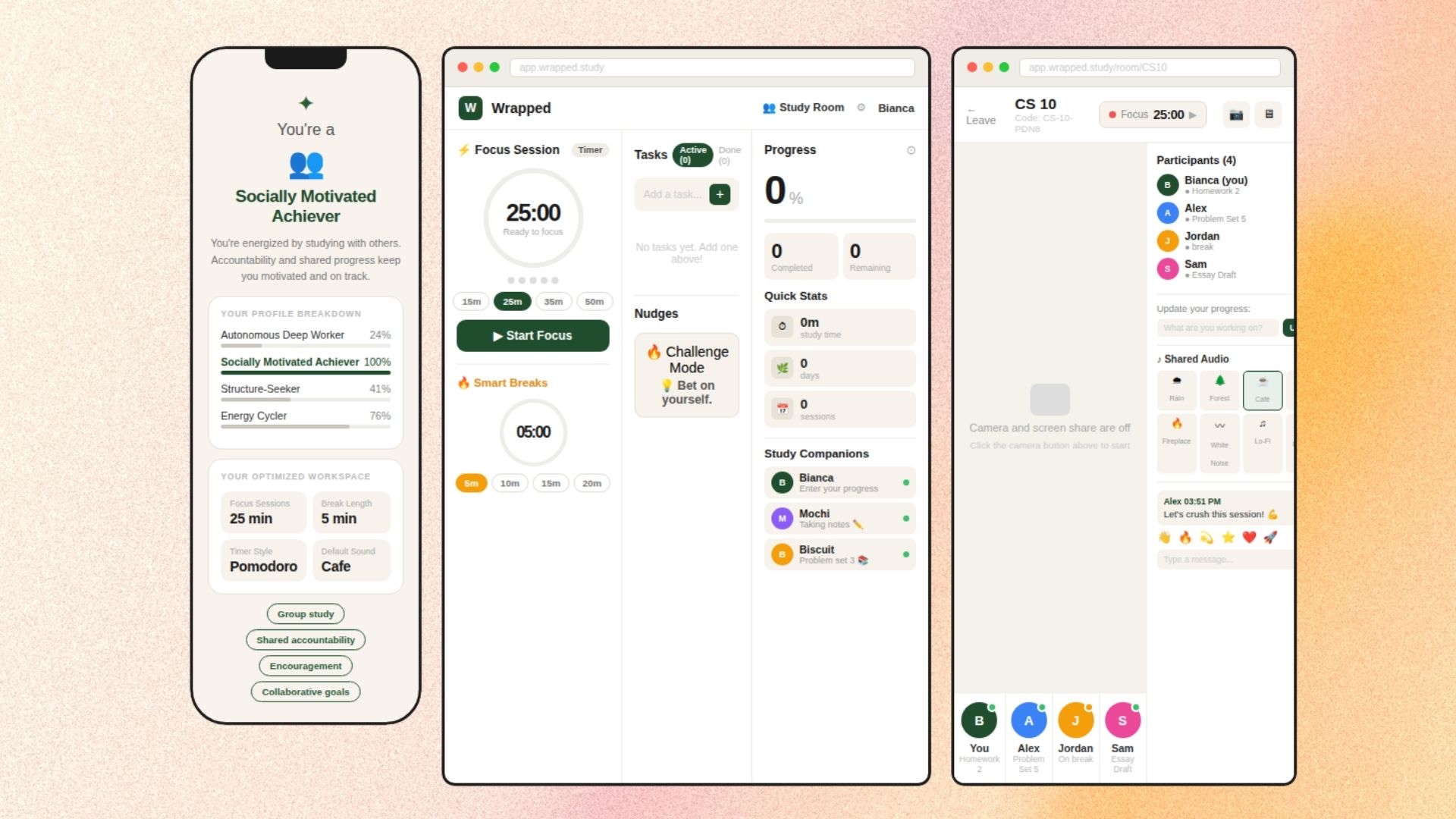
Developed medium-fidelity interactive prototype in Figma with two study modes: individual (self-paced, widget-customizable) and group (social accountability, shared progress).
Pilot Testing
Refining the Experiment
Ran pilot with 2 participants to test experimental procedure. Identified misunderstandings in group mode, refined instructions, and shifted to modular scenario-based task design.
Usability Experiment
Structured Evaluation
Within-subjects experiment with 8 participants comparing individual vs. group study modes. Mixed methods: Likert surveys, think-aloud protocols, behavioral coding, and semi-structured interviews.
Analysis & Iteration
Data to Design Decisions
Analyzed quantitative data with Repeated Measures ANOVA and qualitative data through thematic coding. Findings directly informed the final webapp redesign.
Final Product
Wrapped Web App
Rebuilt Wrapped as a full Next.js web application incorporating all research findings - improved visual hierarchy, responsive widgets, and streamlined navigation.
Within-subjects experiment with counterbalanced order to prevent learning effects.
Procedure
- 1Pre-study survey (demographics, study habits, app experience)
- 2Individual study mode interaction with think-aloud
- 3Group study mode interaction with think-aloud
- 4Independent navigation & task management session
- 5Post-task Likert surveys (10-point scale)
- 6Semi-structured interviews
Intuitiveness
Quantitative · 10-point Likert
Engagement
Quantitative · 10-point Likert
Distraction
Quantitative · 10-point Likert
Future Use Likelihood
Quantitative · 10-point Likert
Behavioral Observation
Mixed · Coding Sheet
User Insights
Qualitative · Semi-structured Interview
Mean ratings on 10-point Likert scale (N = 8)
No significant difference between modes overall - but each serves different psychological needs. Individual mode offers clarity and autonomy; group mode provides motivational support.
Mean usability ratings (N = 8)
Core task actions scored high, but status reflection features (viewing completed tasks, understanding navigation logic) revealed usability gaps - directly informing the webapp redesign.
Study Mode Preference
“I use individual study every day… it fits naturally.”
- P2 · Individual
“Having a study partner really motivates me.”
- P1 · Group
Widget Customization
“Customization is very important… people have different needs.”
- P2 · Insight
“I'd pick the break timer and music… it matches how I already study.”
- P5 · Alignment
Design Feedback
“Make it more colorful and less static-looking.”
- P2 · Visual
“The little icon click boxes were tiny.”
- P4 · Usability
“There was no written description. It only had icons, so that was slightly confusing.”
- P6 · Clarity
Barriers & Concerns
“What would discourage me would be like bad UI and not knowing the person.”
- P3 · Group
“I wouldn't use it unless I really know the other person.”
- P7 · Trust
Study Mode Preference
Individual for flexibility & low cognitive load; group for accountability
Intuitiveness
Clear progress indicators and widget responsiveness drove perceived ease
Motivators & Barriers
Social motivation vs. peer pressure and UI complexity in group mode
Widget Customization
One-size-fits-all is inadequate - users need personalized study configurations
Design Recommendations
Better spacing, button affordances, confirmation cues, and social awareness features
Field Observation
Paper-based contextual inquiry revealed students toggle between 3-5 apps during study sessions. Key insight: students want guidance, not restriction.
Lo-Fi Prototype
Hand-drawn wireframes exploring widget-based layouts. Tested core concepts: configurable widgets, progress visualization, and dual study modes.
Medium-Fi Prototype (Figma)
Interactive Figma prototype with full task flows for individual/group modes. Added music widget, break timer, ChatGPT integration, goal setting, and Do Not Disturb.
Post-Experiment Redesign
Addressed usability findings: enlarged touch targets, added text labels to icons, improved task completion visibility, and streamlined group mode onboarding.
Wrapped Web App
Final product built in Next.js - responsive design, real widget functionality, improved visual hierarchy, and deployed on Vercel for public access.
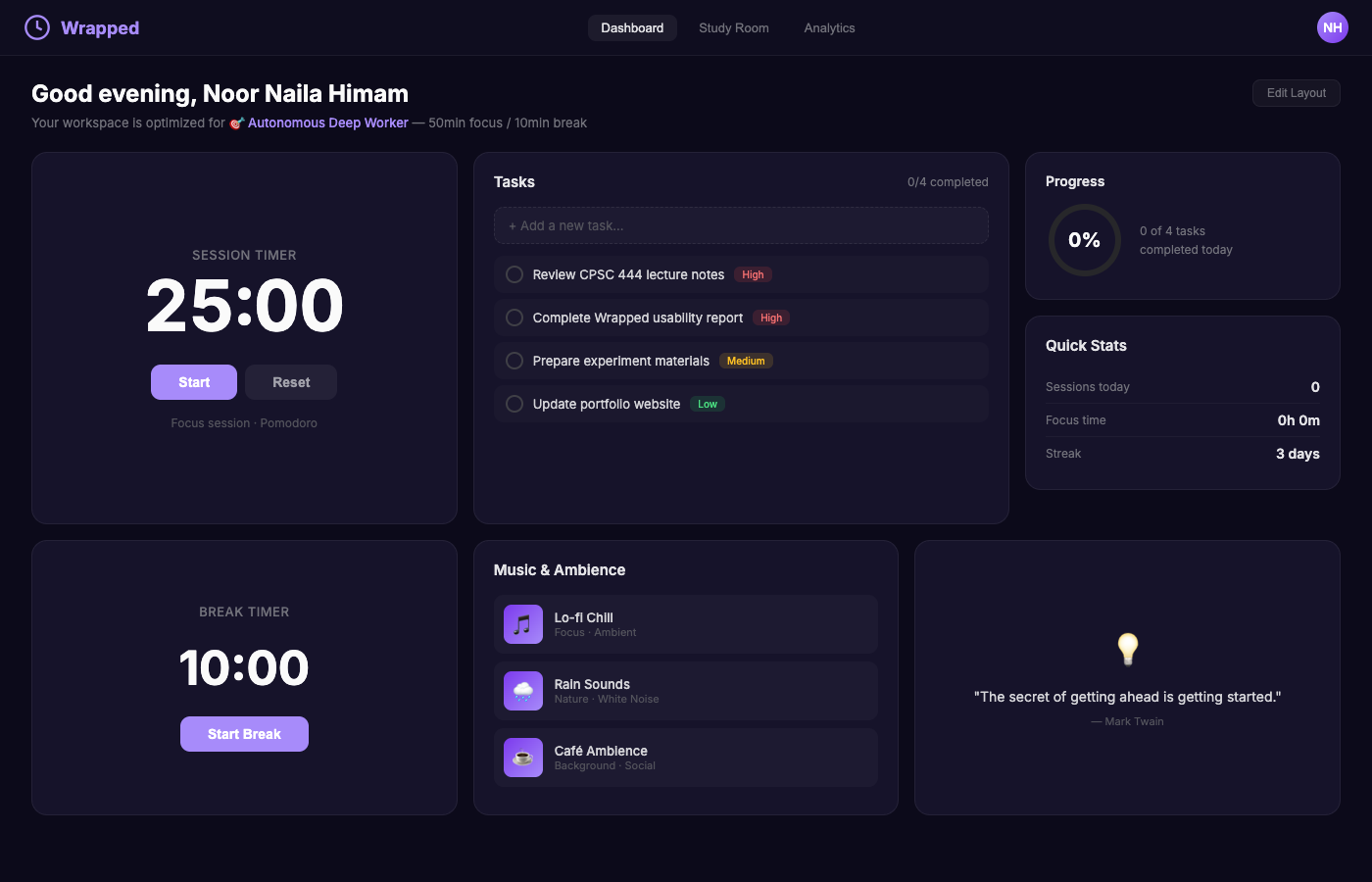
Dashboard - Adaptive widget-based workspace with Session Timer, Task Manager, Progress tracker, and Quick Stats. Greeting and archetype personalization shown.
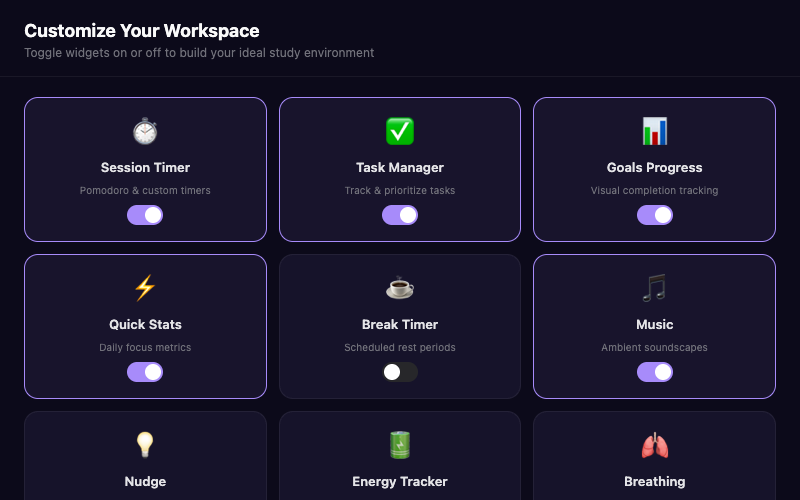
Widget Customization - Users select from 11 configurable widgets including Focus Score, Energy Tracker, Breathing exercises, and Body Doubling for social accountability.
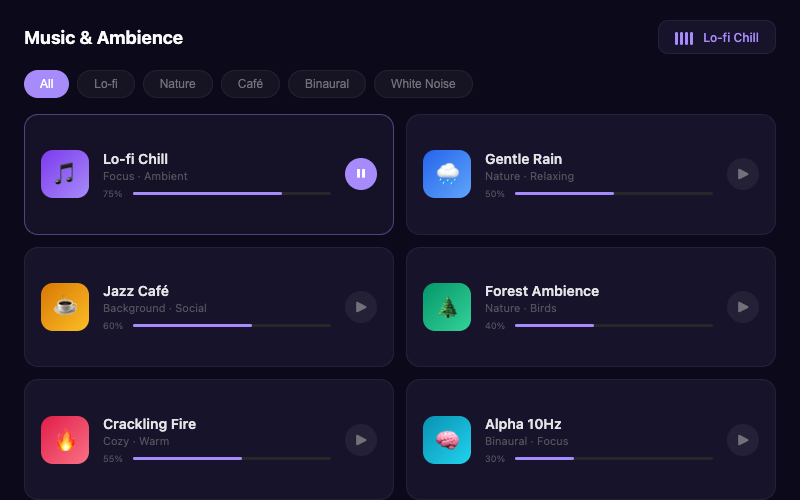
Music & Ambience - Integrated soundscapes (Lo-fi, Rain, Café, Forest, Binaural Beats) designed to support focus without leaving the study workspace.
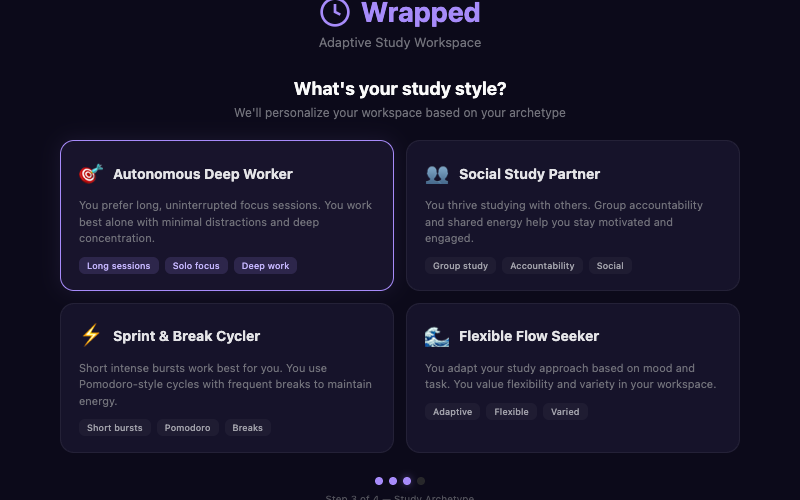
Onboarding & Archetypes - Personalized quiz identifies study archetype (e.g., Autonomous Deep Worker, Social Study Partner) to pre-configure optimal widget layouts.
Combining usability testing with thematic analysis
Learned to capture both measurable outcomes and lived experiences, revealing insights that neither method alone could surface.
Emotional trajectories in user interaction
Discovered how to identify and interpret emotional arcs during user sessions, linking them directly to design improvements.
Translating feedback into actionable changes
Strengthened my ability to convert raw user feedback into specific, prioritized design decisions - balancing group dynamics with individual contributions.
Research communication across formats
Improved skills from academic reports to engaging visual storytelling - blog posts, video segments, and interactive presentations.